The Haryana government has implemented the Parivar Pehchan Patra (PPP) scheme to provide a unique identification number to each family in the state. This detailed guide explains how to register for the Haryana Family ID, also known as PPP Haryana.
Before You Begin: What You'll Need
Essential Documents for Registration:
- Aadhaar cards of all family members
- Family head's active mobile number
- Address proof (e.g., electricity bill)
- Age proof for all members (e.g., birth certificates, matriculation certificates)
- Voter IDs for adult members (if available)
- Bank account details for direct benefit transfers (optional)
- Income or caste proof (if applicable)
- PAN card (if available)
Preparation Tips:
- Scan all documents in PDF format, with each file under 200 KB
- Ensure the mobile number you're using is active and can receive OTP
- Keep information about all family members ready (dates of birth, education details, etc.)
- Set aside at least 30-45 minutes to complete the registration process without interruptions
Step-by-Step Registration Process
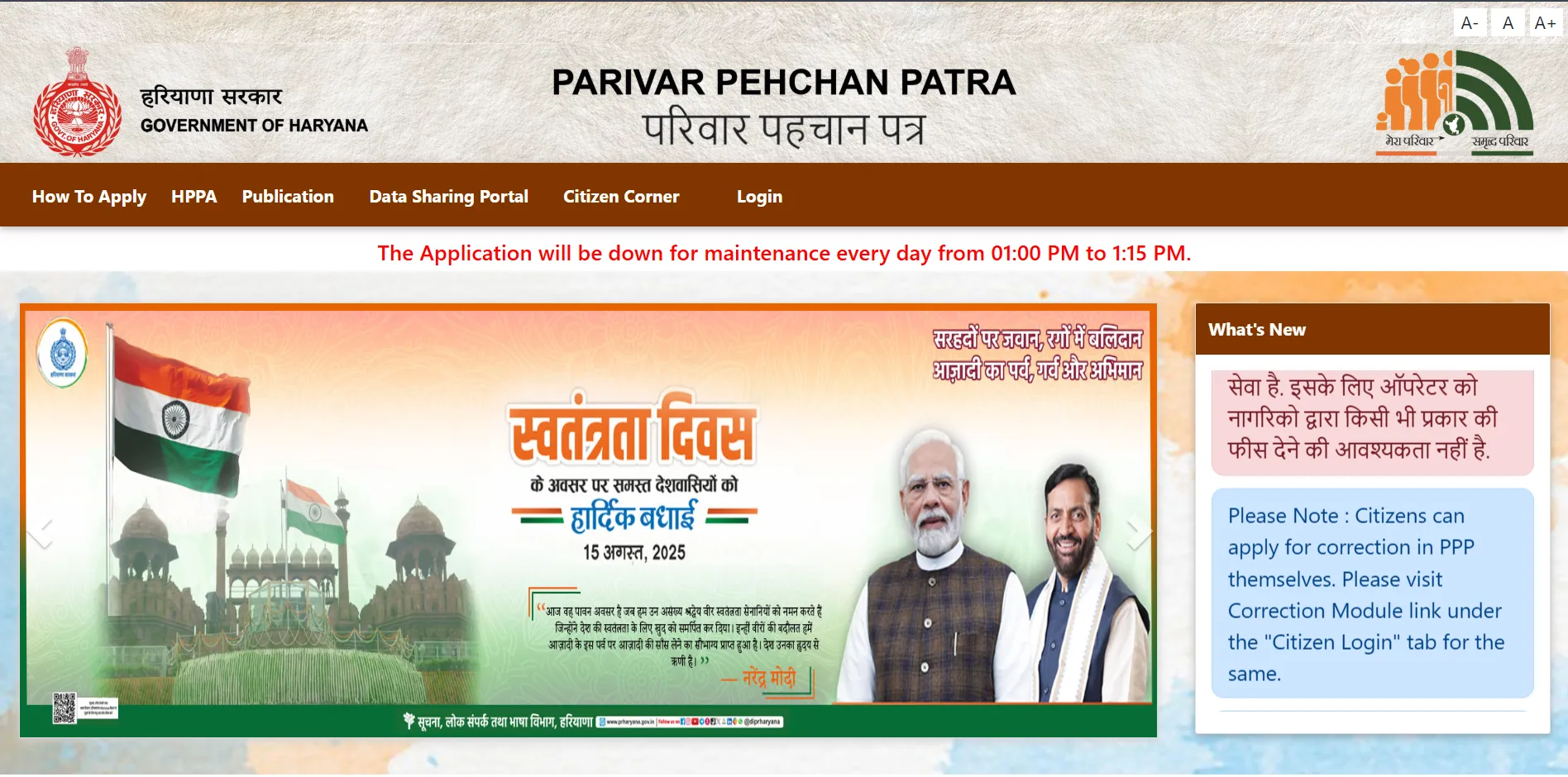
Step 1: Visit the Official Website
Open the official PPP Haryana portal at https://ppp-office.haryana.gov.in/
Step 2: Navigate to Registration
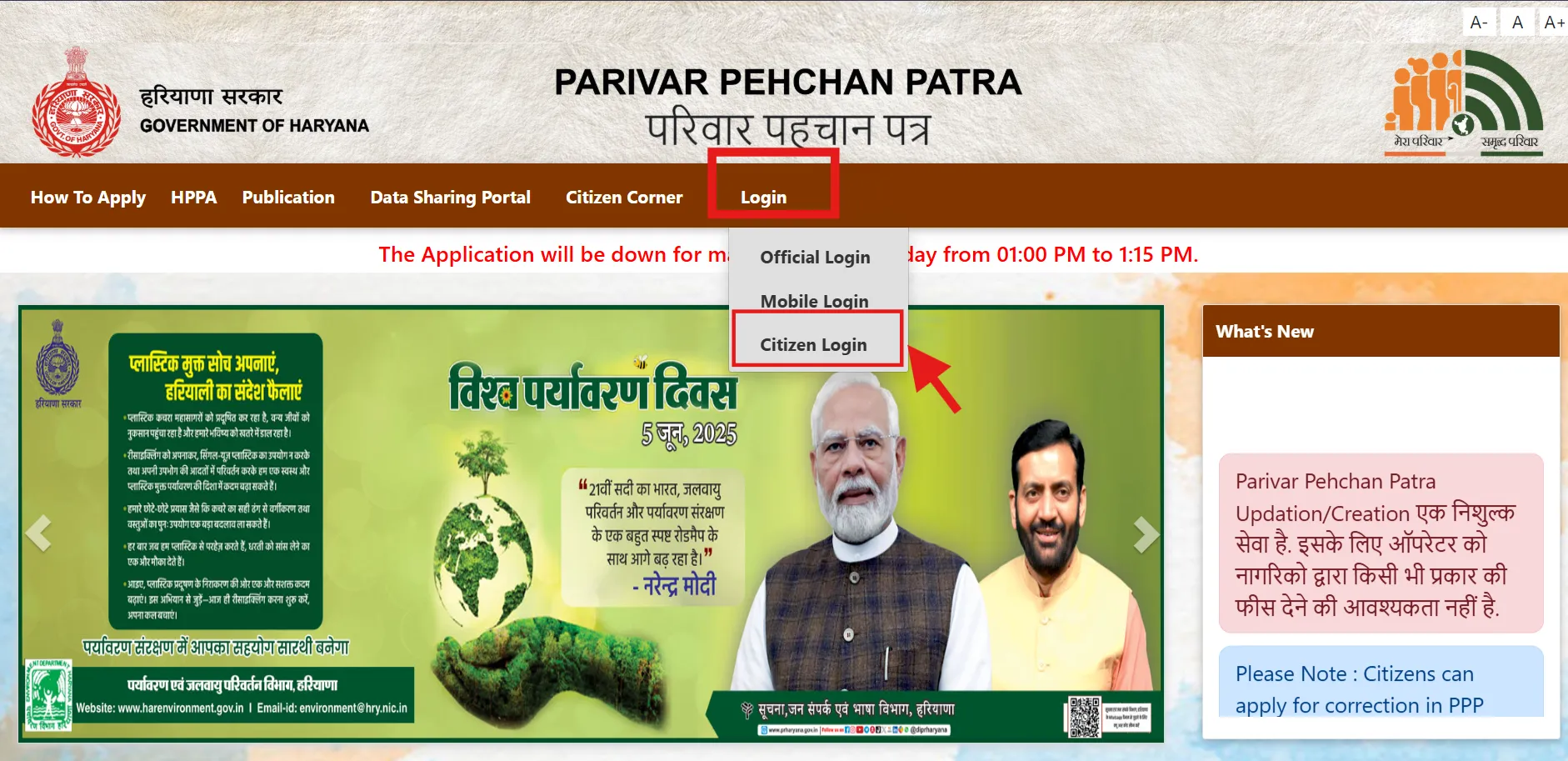
Click on "Citizen Login" option on the homepage.
When asked if you have a Family ID, select "No" to create a new Parivar Pehchan Number (PPN).
Step 3: Enter Aadhaar Number
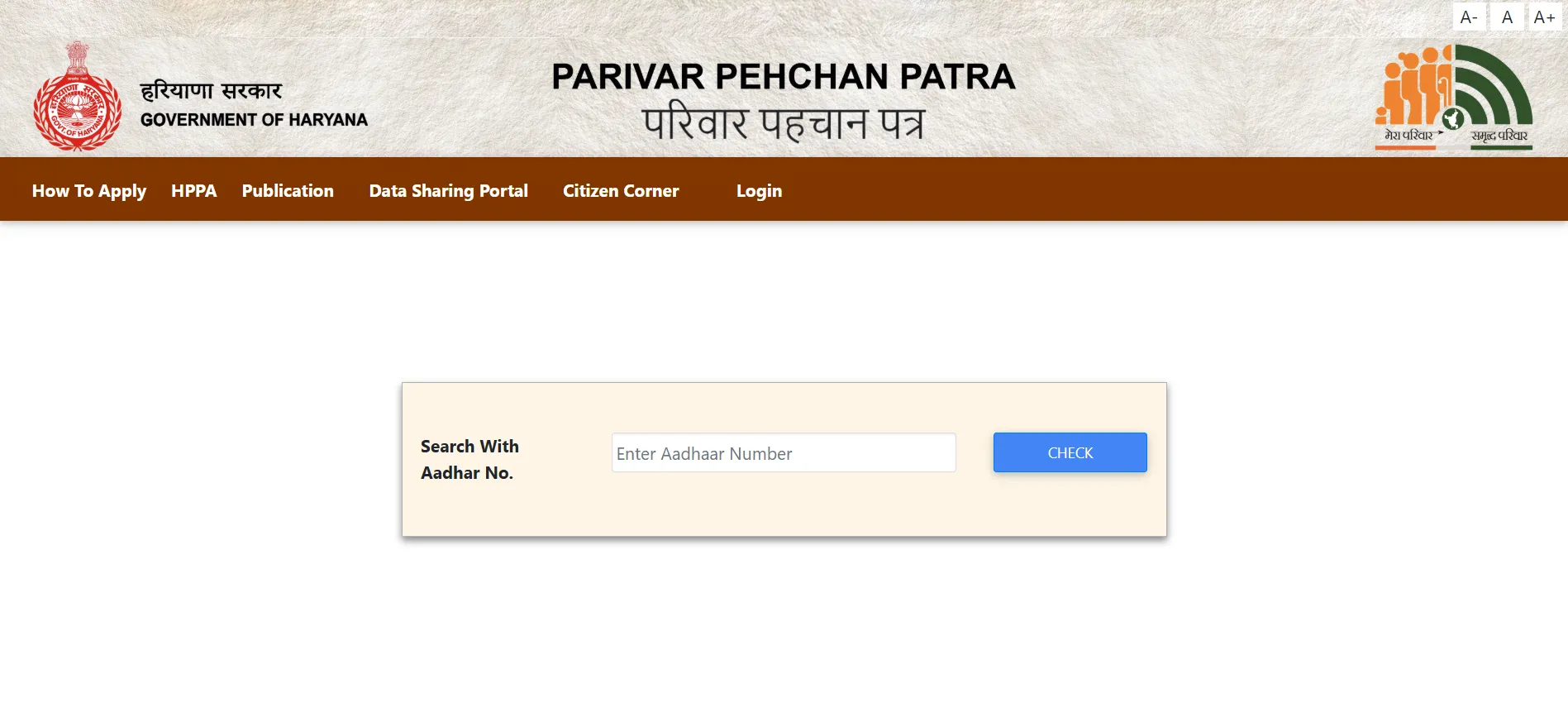
Enter the Aadhaar number of the head of the family.
An OTP will be sent to the mobile number linked with this Aadhaar.
Step 4: OTP Verification
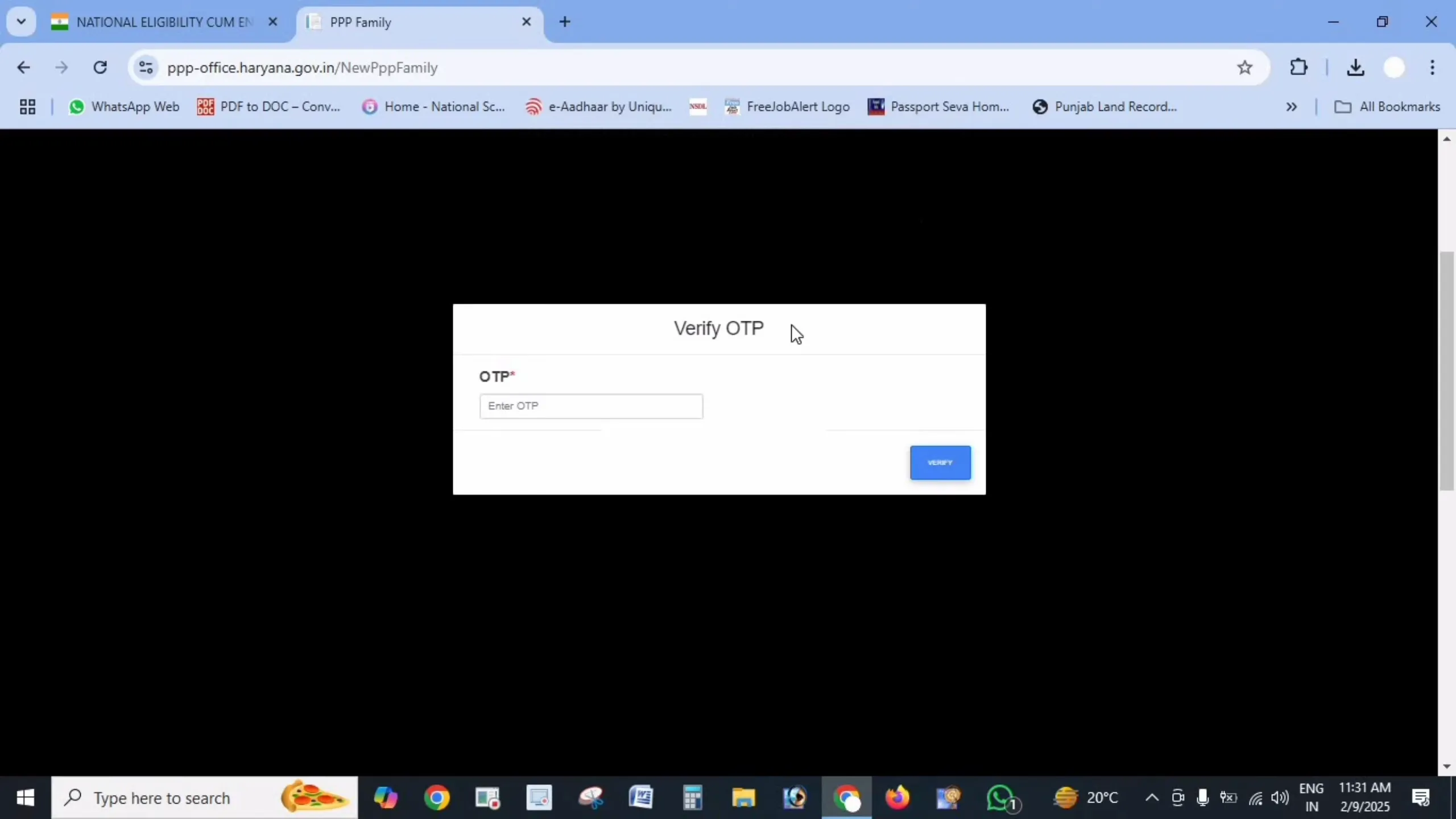
Enter the OTP received on the mobile number linked to the Aadhaar card to verify your identity.
Step 5: Fill in Personal Details
After OTP verification, some information from your Aadhaar (such as name and date of birth) will be auto-filled.
You need to provide additional details:
- Name in Hindi (first and last name, if applicable)
- Date of birth verification document (select from school certificate, birth certificate, voter ID, or matriculation certificate)
- Document issue date and number
- Gender
- Marital status
- Place of birth (specify if Inside or Outside Haryana, with district/town details)
- Duration of residence in Haryana
- Mobile number (mandatory field)
- Email ID (optional)
- Caste category (provide proof if SC/ST/OBC)
- Disability status (if yes, specify percentage and provide proof)
- Voter ID details (if applicable)
- PAN card details (if available)
- Annual income and source of income
Step 6: Upload Required Documents
Upload clear PDF copies (each under 200 KB) of these documents:
- Aadhaar cards of all family members
- Age proof documents
- Voter IDs (for adult members)
- Address proof
- Income or caste certificates (if applicable)
- Bank passbook or statement (for DBT)
- PAN card (if available)
Document Tips:
- Ensure all document scans are clear and legible
- If a document is more than 200 KB, compress it using PDF compression tools
- Make sure the document format is PDF, not JPG or PNG
Step 7: Add Family Member Details
Enter details of all family members, including:
- Father's details (whether alive or deceased, Aadhaar number, name in English and Hindi, date of death if applicable)
- Mother's details (Aadhaar number, name in English and Hindi)
- Spouse's details (if applicable, including alive/deceased status)
- Current address (house number, street, district, block, property ID, ownership status)
- Details of other family members (children, etc.) including their Aadhaar, name, date of birth, and relationship with the head
Step 8: Review and Submit
Carefully review all the information you've entered to ensure accuracy.
Incorrect information may lead to rejection of your application or issues in receiving benefits.
Once verified, click on the "Submit" button.
Step 9: Note Your Temporary ID
After successful submission, you'll receive a temporary Family ID number (usually starting with 'T').
Note down this number or take a screenshot for future reference.
This temporary ID will be valid until your application is verified (typically 10-30 days).
After Registration: What's Next?
- Track Your Application: Use your temporary ID or registered mobile number to check the status of your application regularly.
- Verification Process: Your application will undergo verification by local authorities, which typically takes 10-30 days.
- Permanent ID: Upon successful verification, your temporary ID will be replaced with a permanent 8-digit Family ID.
- Download Your ID: Once approved, you can download your Family ID from the portal.
Common Registration Issues and Solutions
Issue: OTP Not Received
Solution: Check if your Aadhaar has the correct mobile number. If not, you may need to update your mobile in Aadhaar first or visit a Saral Kendra for assistance.
Issue: Document Upload Failures
Solution: Ensure your documents are in PDF format, under 200 KB, and clearly legible. Try compressing the file size if needed.
Issue: Application Gets Stuck
Solution: Clear browser cache, use a different browser, or try registering during non-peak hours when server load is lower.
Issue: Aadhaar Verification Failed
Solution: Double-check the Aadhaar number entered. If the problem persists, your Aadhaar may need updating. Visit a nearby Aadhaar center.
Issue: Unable to Add Family Members
Solution: Ensure you have all necessary details for each member. If a particular member's details are causing issues, try completing the registration with other members first, then update later.
Registration via Saral Kendra
If you face difficulties registering online, you can visit your nearest Saral Kendra for assistance:
- Bring all original documents and photocopies
- The staff will help you fill the application form
- They will scan and upload your documents
- You'll receive a temporary ID number for tracking
Benefits of PPP Haryana Registration
- One-Time Registration: Register once and access multiple government schemes
- Easy Access to Benefits: Simplified process for receiving government benefits
- Automatic Updates: Some life events get updated automatically through linked systems
- Digital Record: Maintain a digital record of your family information
- Centralized Database: All family information stored in one place
Important Links
| Purpose | Link |
| Registration Portal | https://ppp-office.haryana.gov.in/ |
| Track Application | https://meraparivar.haryana.gov.in/ |
| Find Nearest Saral Kendra | https://saralharyana.gov.in/ |
Frequently Asked Questions
Who should apply for the Family ID?
The head of the family (typically the oldest male member or primary earner) should apply on behalf of the entire family.
Is Aadhaar mandatory for all family members?
Ideally, all family members should have Aadhaar. However, for very young children who don't have Aadhaar yet, you can register them later through the update process.
Can NRIs apply for Haryana Family ID?
Yes, NRIs with property or permanent residence in Haryana can apply, but they need to provide proof of their connection to Haryana.
What if I don't have some of the documents listed?
Some documents are mandatory (like Aadhaar), while others are optional. If you're missing certain documents, visit a Saral Kendra for guidance on alternatives.
How do I know if my registration is successful?
You'll receive a temporary ID number after successful submission. Once your application is verified and approved, you'll get a permanent Family ID.
Can I edit my application after submission?
No, you cannot edit your application after submission. If you notice errors, you'll need to wait until your ID is issued and then use the update process.
What if my application is rejected?
If rejected, you'll be notified of the reason. Address the issues mentioned and reapply with the correct information.
Is there any deadline for registration?
While there's no strict deadline, registering early ensures you don't miss out on government benefits that require a Family ID.